Friday, 2 December 2011

My street progress

In this post i will explain the process behind my 3d street but first, some images of the buildings i have made so far.

This here is a house which is a modified version of a storage house shown further down. This is still work in progress as you can tell by the floating dragon head.

Here is a completed Long house, i am very pleased with the end result mainly because of how accurate it is to a reference photo i was using. 

This is the storage house that i mentioned earlier, it is made from an image i was researching  and the decoration is on the roof is taken from an image of a long house.

Here is a turf house, again, like the other models i have made  i have used an image as a reference. i will soon add some textures to it. 


This here is a dragon head, from my research these heads seem to be everywhere in ancient Nordic architecture. The one i made is mostly inspired by a video game i used to play.

Below is my progress on the street so far.


Friday, 25 November 2011

Light reflections


In 3D max i made a small room with two windows and a light source shining through them. First i created a huge box for the room, then i cut some squares into the side for the windows, next i put a camera inside the room so that i could see inside because i needed to make sure the light was shining at the right angle. To add the effect of sunlight i changed the light's colour to yellow, after that i added two sky portals to put light outside the windows. Lastly i played around the light reflections so it could travel around the room and then i added a sphere with different materials for experimentation.

Friday, 18 November 2011

Bin


In 3d max i had to make a bin that was partly transparent and had a shadow. I also had to make the floor look smooth. First i had to make a plane, next i added texture to it this is where i had to add a bump map to the plane. Then i added a similar texture which was in black-and-white to the same plane, lastly i adjusted the glossiness and specular levels to add shine to texture.

For the bin i created a cylinder, then i added a wire fence texture in the materials editor. I had to add the same texture which had some transparency added to the object, then i adjusted the tiling to make the grates smaller.  Finally i added a spotlight which cast a shadow behind the object.

Friday, 21 October 2011

Lathe


In 3d max i made a shape using the line shape tool. First a drew half a shape with lines, then i modified it using lathe which turns it into polygons. to make it transparent i went into the materials editor and adjusted the specualar and glossiness levels to my specification and added colour to it.

Smooth 3D lamp post

In 3ds Max i had to make a lamp post to be used in our street. I started with a cylinder which i made specific measurements for, then i used inset to pull the sides in, after that i extended the middle part upwards to make the pole. At the top of the pole i added a bit more height to it and extruded it so i could rotate it at 90 degrees. After that i extruded it a bit more then i rotated again as mentioned previous, Finally i stretched the end out to look like the lamp as seen on lamp posts and then smoothed it out. i also added a metal texture to it.

Friday, 14 October 2011

more 3d textures

In max i had to add textures and lights to shapes. I also had to make brick textures to match up with real life scale.


Here i had to make a window or door frame. first i made two boxes, one for the frame and one to make the hole. i made one smaller than the other. then i streched the inside box so it came out the other side. afterwards i changed the frame to a compound object and added a boolean then i clicked on "pick operand" and selected the inside box. then it was removed.


Thursday, 13 October 2011

Architectural styles

For my street i have decided to go with a Norse/Viking theme. I chose this theme because of its architecture, things such as the sloped roofs, the timber and the decorations on the peaks of the roof.

This is a Stave church. I like this image because of the wood panelling and the sloped roofs. 

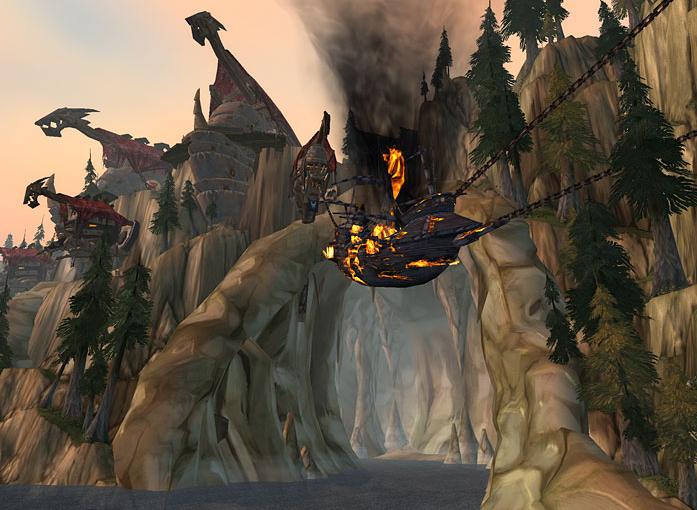
This is from World of Warcraft. It is one of my favourites because of the buildings and their parapets on the cliff to the left. 


This is a storage building. I really like the way the wood is carved on the second floor. even though the wood has been worn away i really like the colour and texture of it. 

These are turf houses. This caught my eye because of the roofs and how they are made from soil, i also like the wooden fronts to them.


http://www.wowscreenshot.com/image/Utgarde-Howling-Fjord.jpg
http://i1-games.softpedia-static.com/screenshots/8-5598_1.jpg
http://warcraftonline.files.wordpress.com/2008/12/wowscrnshot_120308_122018.jpg
http://scrntag.com/thumbs/screenshot/373/full/display.jpg
http://www.wow-serbia.com/images/stories/news/wotlk/Istances/Utgarde_Keep/Utgarde_Keep_01.jpg
http://hulantheholy.net/wp-content/uploads/2009/03/utgarde_keep.jpg
http://hulantheholy.net/wp-content/uploads/2009/03/fjord_boat.jpg
http://media.photobucket.com/image/norse%20architecture/ksjyoung/Stormy_Fiord_300w.jpg
https://blogger.googleusercontent.com/img/b/R29vZ2xl/AVvXsEhcuov0D_7RdqA8dpeitSI8HwLSWT4uUSa69HibUnMI03GNL1Gbe-HnuXca4PF_lLFEZFwSKBfa5J1q4yn0HgW44xipqRVEU9l0Gpp4VXQiH7_kukB6TRf7nZ1CykhZCKcAxCTLyGTd1TQ/s640/41-51chapelinthehills.jpg
http://www.playstationwallpapers.com/media/full/ps3/the-elder-scrolls-v-skyrim/the-elder-scrolls-v-skyrim_75083_skyrim-9.jpg
http://www.scandinavianaggression.com/centrum/public-service-announcement-for-new-england-monuments-to-greatness
http://www.hickerphoto.com/images/500/norstead-viking-village_19813.jpg
http://stud.hsh.no/arbeider/2007/Grov/Skandinavia/Borgund%20stavkirke.jpg
http://www.purselipsquarejaw.org/uploaded_images/loft_storehouse-709089.jpg
http://www.mailintalks.com/wp-content/uploads/2009/06/viking_architecture_flam.jpg
http://images.wikia.com/wowwiki/images/a/a8/Howling_Fjord_Vrykul.jpg

Friday, 30 September 2011

In photoshop we were editing an image of an apartment building to use for a texture.


In the image i used the polygonal lasso tool to cut around the signs and used the content aware fill to cover the selected area with parts of the original image. for the window above the door i used the patch tool to draw a mask around the window and dragged the mask around an area of the wall and then i used the healing brush to clear up the rough edges. The original image is below.


Friday, 23 September 2011

Building modelling

Please note the trees and sign.


Please note the big glass window and the small ones.


Please note the uplights along the paving.

Please note the bikes.

Please note the huge poster.

Please note the trees, bikes and the car.


Please note the flags in the window and the blackboards.

Please note the drain pipe.

Please note the windows.


Please note the windows down the middle.


Please note the lamp post, the tree and the car.


Please note the bars and the ashtray.


Please note the box.


Please note the spiral staircase and fire escape .


Please note the roof.


Please note the cars.


Please note the car.


Please note the motorbike and drainpipe .


Please note the archway and the dustbin.


Please note the grating.


Please note the windows, railings and pillars at the top.